- Empty cart.
- Continue Shopping
What Is Arduino? A Complete Beginner’s Guide for Students and Hobbyists
- Posted on
 Deepak Joshi
- 0
- Categories: Technology,Arduino Projects,Arduino Tutorial,Arduino Uno,DIY Electronics,Electronics,IoT,Microcontroller,Rudr Mart,STEM Education

Introduction
If you are interested in electronics, robotics, IoT, or programming, you have probably asked yourself: What is Arduino?, and why is it so popular among students, hobbyists, and engineers worldwide?
Arduino is an open-source electronics platform that makes it easy to create interactive projects using hardware and software. Whether you want to build a simple LED blinking circuit, a smart home automation system, or a robotics project, Arduino provides an excellent starting point.
In this beginner-friendly guide, you’ll learn what Arduino is, how it works, its main components, applications, and how you can start building your own projects.
What Is Arduino?
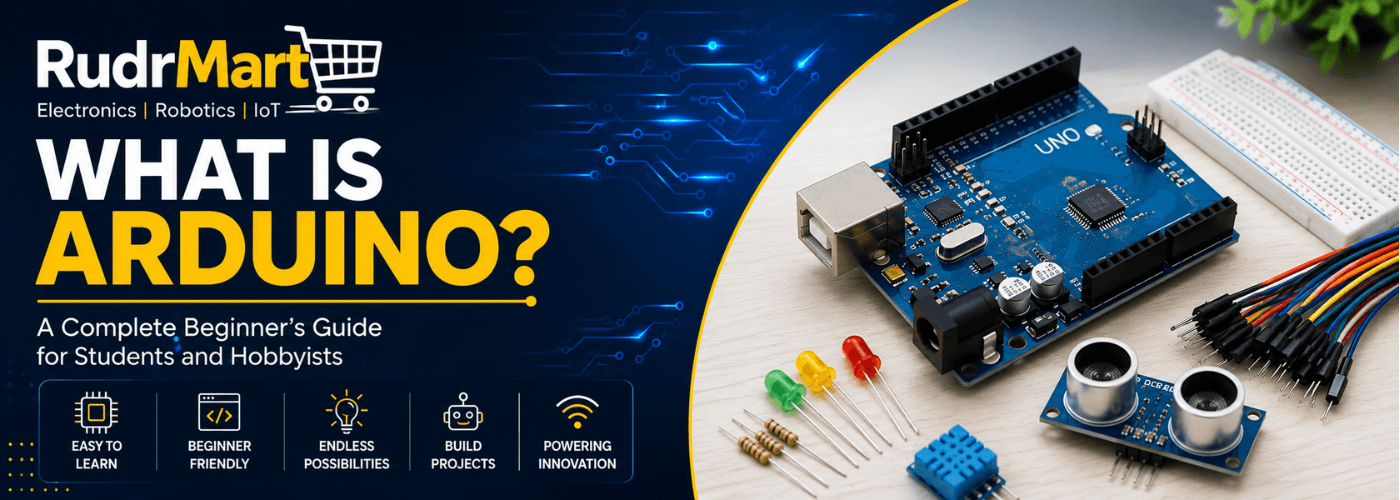
Understanding what is Arduino is the first step toward building exciting electronics and robotics projects. Arduino is an open-source microcontroller platform designed to help users create electronic projects without requiring advanced engineering knowledge. It consists of a programmable circuit board called an Arduino board and a software application known as the Arduino IDE (Integrated Development Environment).
The platform was created to make electronics and programming accessible to students, educators, hobbyists, and developers. Today, Arduino is widely used in educational institutions, research labs, robotics projects, IoT systems, and DIY electronics.
One of the biggest advantages of Arduino is its simplicity. Even beginners can start building working projects within a few hours of learning the basics.
Why Is Arduino So Popular?
Once you understand what is Arduino, it becomes easier to see why millions of people use it for learning electronics and programming. Arduino has become one of the most popular development platforms because it offers several advantages:
Easy to Learn
Arduino uses a simple programming language based on C/C++, making it beginner-friendly.
Affordable Hardware
Arduino boards and compatible components are affordable and widely available, making them suitable for students and hobbyists.
Open-Source Platform
Both the hardware and software are open source, allowing users to customize and improve their projects.
Large Community Support
Millions of users worldwide contribute tutorials, project ideas, libraries, and troubleshooting guides.
Wide Range of Applications
Arduino can be used in robotics, automation, IoT, home security, environmental monitoring, and many other fields.
Main Components of an Arduino Board
To understand how Arduino works, it’s important to know the main components found on a typical Arduino Uno board.
Microcontroller
The microcontroller acts as the brain of the board. It processes instructions and controls connected devices.
Digital Input/Output Pins
These pins allow the board to communicate with sensors, LEDs, relays, motors, and other electronic components.
Analog Input Pins
Analog pins are used to read varying signals from sensors such as temperature sensors, light sensors, and potentiometers.
USB Port
The USB port is used for programming the board and supplying power.
Power Pins
Power pins provide voltage to external components connected to the Arduino.
Reset Button
The reset button restarts the program running on the board.
How Does Arduino Work?
To truly understand what is Arduino, you need to know how it reads inputs, processes information, and generates outputs.
For example:
- A sensor detects an object.
- The Arduino receives data from the sensor.
- The program analyzes the information.
- Arduino activates an output device such as an LED, buzzer, relay, or motor.
This simple input-process-output system allows Arduino to control a wide range of electronic devices and systems.
Essential Components Needed for Arduino Projects
While an Arduino board is the main component, most projects require additional electronic parts.
Breadboard
A breadboard allows you to create circuits without soldering, making experimentation easy.
Jumper Wires
Jumper wires are used to connect components and modules to the Arduino board.
LEDs
LEDs are commonly used in beginner projects to learn digital output control.
Resistors
Resistors protect components by controlling the flow of electrical current.
Sensors
Sensors allow Arduino to detect environmental conditions such as distance, temperature, light, humidity, and motion.
Relay Modules
Relay modules enable Arduino to control high-voltage devices safely.
Bluetooth and Wi-Fi Modules
Communication modules help Arduino connect with smartphones, computers, and IoT platforms.
Popular Arduino Applications
Arduino is used in thousands of applications across various industries.
Robotics
Arduino is commonly used to build robots, robotic arms, line-following robots, and obstacle-avoiding vehicles.
Internet of Things (IoT)
Developers use Arduino to create smart devices that connect to the internet and exchange data.
Home Automation
Arduino can control lights, fans, appliances, and security systems.
Environmental Monitoring
Sensors connected to Arduino can measure temperature, humidity, air quality, and other environmental parameters.
Educational Projects
Schools and colleges use Arduino to teach electronics, programming, and robotics concepts.
Arduino for School and College Projects
Many students searching for what is Arduino are looking for an easy platform to create science fair and engineering projects. Arduino is one of the most popular platforms for educational projects because it helps students understand both hardware and software concepts.
Some common student projects include:
- Smart irrigation systems
- Automatic street lights
- Home automation systems
- Obstacle-avoiding robots
- Line-following robots
- Weather monitoring stations
- Bluetooth-controlled devices
- Smart parking systems
These projects help students gain practical experience while improving problem-solving skills.
Beginner Arduino Project Ideas
If you’re just starting, consider building one of these beginner-friendly projects.
LED Blinking Project
Learn how to control digital outputs using a simple LED.
Distance Measurement System
Use an ultrasonic sensor to measure distances and display results.
Temperature Monitoring System
Monitor room temperature using a temperature sensor.
Bluetooth-Controlled LED
Control LEDs wirelessly using a smartphone and a Bluetooth module.
Automatic Night Lamp
Use a light sensor to automatically switch lights on and off.
These projects provide a solid foundation for learning more advanced electronics and programming concepts.
How to Start Learning Arduino
If you are still wondering what is Arduino and how to start using it, the best approach is to begin with simple projects and hands-on practice.
Step 1: Get an Arduino Board
Choose a beginner-friendly board such as the Arduino Uno.
Step 2: Install the Arduino IDE
Download and install the Arduino IDE on your computer.
Step 3: Learn Basic Programming
Start with simple examples such as blinking an LED and reading sensor values.
Step 4: Experiment with Components
Connect sensors, displays, motors, and communication modules to understand how they work.
Step 5: Build Real Projects
Apply your knowledge by creating practical electronics and robotics projects.
Consistency and hands-on practice are the keys to mastering Arduino.
Choosing the Right Arduino Board
When figuring out what is Arduino board-wise, you’ll find several options available, each designed for specific applications.
Arduino Uno
Best for beginners and educational projects.
Arduino Nano
Compact and suitable for space-constrained applications.
Arduino Mega
Ideal for projects requiring many input/output pins.
ESP8266 and ESP32 Boards
Popular choices for IoT and Wi-Fi-enabled projects.
Beginners should generally start with an Arduino Uno because of its simplicity and extensive community support.
Conclusion
Now that you understand what is Arduino and how it functions, you can see why it has become one of the most widely used electronics development platforms in the world. Arduino makes it easy for students, hobbyists, and professionals to build innovative projects involving electronics, robotics, automation, and IoT.
Whether you’re creating your first LED project or developing a sophisticated smart device, Arduino provides the tools and flexibility needed to turn ideas into reality. By combining an Arduino board with sensors, modules, and basic programming skills, you can begin your journey into the exciting world of electronics and robotics today.
Frequently Asked Questions (FAQs)
1. What is Arduino used for?
Arduino is used to create electronics, robotics, automation, and IoT projects. It allows users to connect sensors, motors, LEDs, and other components to build interactive systems for learning, experimentation, and real-world applications.
2. Is Arduino good for beginners?
Yes, Arduino is one of the best platforms for beginners because it is affordable, easy to learn, and supported by a large global community. Students can start building simple projects with minimal programming knowledge.
3. Do I need programming knowledge to use Arduino?
Basic programming knowledge is helpful, but not required. Arduino uses a simple programming language based on C/C++, and many beginner tutorials are available to help new users get started quickly.
4. What components are needed to start learning Arduino?
To begin learning Arduino, you typically need an Arduino board, a breadboard, jumper wires, LEDs, resistors, sensors, and a USB cable. These components are enough to build many beginner projects.
5. What is the difference between Arduino Uno and Arduino Nano?
Arduino Uno is larger and ideal for beginners because of its easy-to-use design. Arduino Nano offers similar functionality in a smaller form factor, making it suitable for compact projects and embedded applications.
6. Can Arduino be used for robotics projects?
Yes, Arduino is widely used in robotics projects. It can control motors, sensors, servos, and communication modules, making it suitable for building line-following robots, obstacle-avoiding robots, robotic arms, and more.
7. Which Arduino board should a beginner choose?
The Arduino Uno is generally the best choice for beginners because it is easy to use, well-documented, and compatible with a wide range of sensors and modules. It is commonly used in schools, colleges, and hobby projects.